Meet ratcast: peer-to-peer calls and screen sharing for watching things together
ratcast is a free, open-source app for group calls and screen sharing: no account, no server in the middle, end-to-end encrypted, AV1 video up to 4K.
My friends and I live in different cities, and we have a habit that is probably familiar: on a free evening one of us puts on a movie or starts a game, shares the screen, and everybody else watches and talks over it. For years the place for that was Discord. Then Discord ended up blocked where we live, and every evening started with the same ritual: switch on a workaround, find out which of us it was failing for today, switch it off again afterwards because it broke something else. It was tiring in a way that has nothing to do with movies.
I already had most of the pieces for something better lying around. For a search engine I maintain I had written librats, a library that connects two programs directly over the internet, with no server in the middle. At work I had spent years with video transports like SRT and RIST. So I put the two together, and the result is ratcast: a free, open-source desktop and mobile app for voice calls and screen sharing, built around one use case. One person shares something, the others watch it live, everyone talks.
This post is the introduction: what ratcast is, where it fits next to the apps you already use, and how it manages to work without a company’s servers carrying your video. There is some technology in here, but I promise to keep it readable.
What it is, in one paragraph
You open ratcast and press Make a room. It gives you a link that looks like https://ratcast.app/r/#…. You paste it into whatever messenger your friends use. They click it, the app opens and joins. You press Share, pick a screen or a single window, and decide whether its sound goes too. They press Watch. That is the whole flow. There is no account to create, no email, no phone number, no subscription, and the picture travels from your computer straight to theirs, encrypted so that nobody in between can see it.
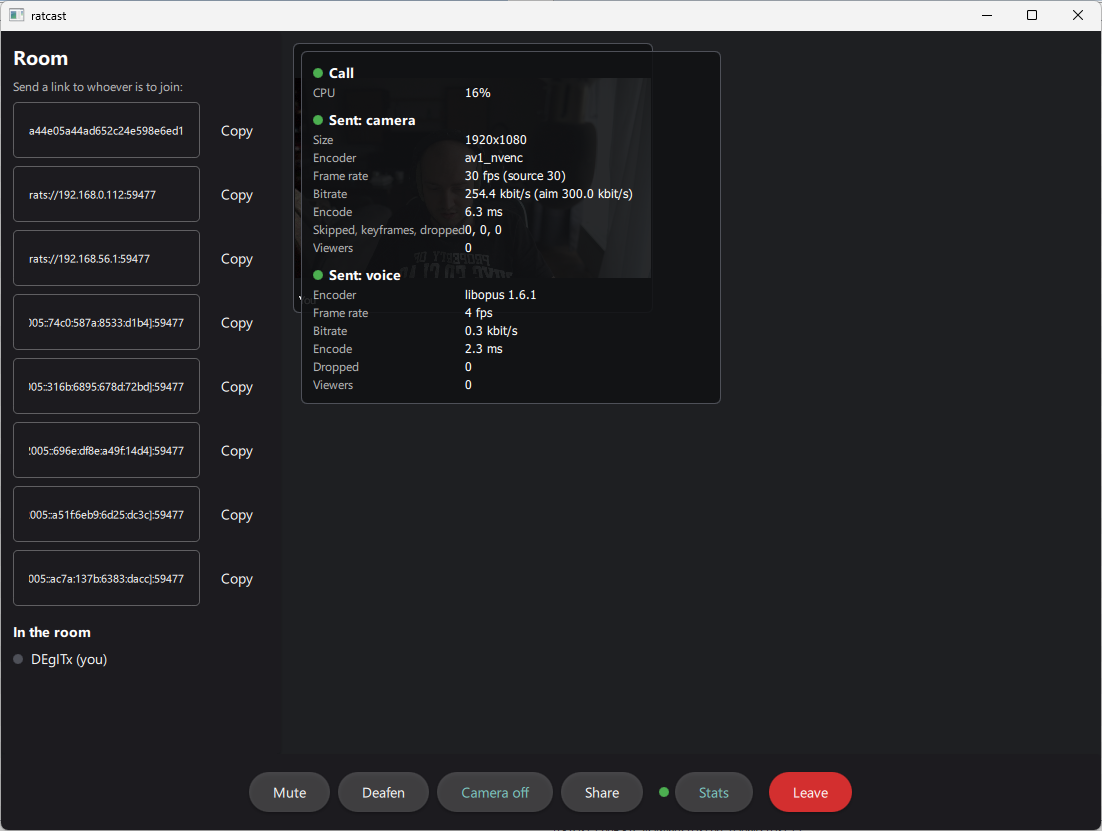
It runs on Windows and Linux, with macOS (Apple Silicon) and Android in preview. It speaks twelve languages, it is MIT licensed, and the code is on GitHub.
Where ratcast fits next to Discord, Zoom and the rest
The fastest way to understand a new app is to place it next to the ones you know. ratcast overlaps with a lot of them, and replaces none of them completely, so here is the honest map.
| If you use… | ratcast is… |
|---|---|
| Discord (voice channels, Go Live screen sharing) | The part of Discord I actually used: talking and sharing a screen with friends. Discord routes every call through its own servers, and sharp, smooth streams cost extra. ratcast connects people directly, with no quality tiers. What it does not have: big public communities, text channels with history going back years, bots. |
| Zoom, Google Meet, Microsoft Teams | The same “send a link, people join” idea, without the sign-in, the time limits or the meeting host. It is built for watching a share together rather than for presentations to 300 people. |
| Teleparty, Watch2Gether, Rave, Kast | Watch-party apps mostly synchronise a video that each viewer streams from a service on their own. ratcast shares the actual picture, so it works for anything you can see on your screen: a local file, a game, a browser tab, a whole desktop. |
| Parsec, Moonlight, Steam Remote Play | Those are for controlling a remote machine or playing a game remotely, usually one person at a time. ratcast is for watching together. The low-latency video is a shared concern; the mouse and keyboard are not. |
| Twitch, YouTube Live, OBS | Broadcasting to strangers, with a delay of several seconds. ratcast is for a small group of people you know, with a delay you do not notice in conversation. |
| Jitsi Meet, Element / Matrix calls | Open-source and self-hostable, which I like. But a group call there still goes through a server somebody has to run. ratcast needs one only as an optional helper. |
| TeamSpeak, Mumble | Excellent voice chat, but you connect to a server first. ratcast has voice with echo cancellation and noise suppression, plus video and screens, and no server to set up. |
| Telegram, WhatsApp, Signal group calls | Convenient, already on your phone, but tied to a phone number, and screen sharing is an afterthought. In ratcast the screen is the main event. |
If I had to fit it in one line: ratcast is a Discord alternative for the “let’s watch something together” evening, without the account, the subscription or the company in the middle.
How it works without a server
The usual way to build a video call is a server in a data centre: every participant connects to it, sends their video up, and gets everyone else’s video back down. It is reliable and it means somebody has to pay for, run and be trusted with that server forever. In some countries it also means one IP range to block and the whole service goes dark.
ratcast does it the other way round, and a few ideas make that possible.
You are a key, not an account
When you first start ratcast it generates a cryptographic key pair on your device, the same kind of thing SSH and WireGuard use. Your public key is your identity. There is no server holding a list of users, so there is no password to leak and nothing to sign up for. To make friends you send your personal link, or click someone’s name in a room. To use the same identity on your phone, you scan a QR code from your computer. Your friends list lives on your devices; you can save a backup if you like.
Finding each other through the BitTorrent network
A room link contains, roughly speaking, the address of the room. But how do two computers that have never met find each other’s IP address without a central directory?
ratcast borrows a directory that already exists: the BitTorrent DHT, a giant distributed address book that torrent clients have been maintaining together for about twenty years, with millions of computers taking part at any moment. Nobody owns it and nobody can switch it off. ratcast does not download anything through it, it only uses it to say “I’m in this room, here’s how to reach me”. On a home network, computers find each other even faster over mDNS, the same mechanism your printer uses to show up.
Getting through home routers
The hard part of any peer-to-peer app is that almost every computer sits behind a router that does not accept incoming connections. ratcast tries a ladder of tricks, cheapest first:
- Ask the router politely to open a port (UPnP and NAT-PMP).
- If it refuses, hole punching: both sides send a packet to each other at the same moment, and each router lets the other’s packet in because it looks like a reply.
- If even that fails, which happens with some mobile and corporate networks, the connection goes through a relay: an optional
ratcast-serverthat anyone can run. It passes along encrypted bytes it cannot read.
Most calls never reach step three.
What happens when seven people want to watch
Pure peer-to-peer has one honest weakness, and I would rather explain it than hide it. If you share your screen to six friends directly, your computer sends six copies of the video. Home internet is usually much slower uploading than downloading, so at some point your upload runs out.
ratcast handles this by rearranging the room on the fly, one viewer at a time:
- Through another viewer. A friend with a fast connection receives the video and passes it on to others exactly as it came, without re-encoding it. Their computer becomes a little relay inside the room.
- Through a server. If a
ratcast-serveris around, it can take one copy and fan it out to many viewers, the way Discord’s or Zoom’s servers do. The difference is that here the video stays encrypted and the server never gets a key. - Directly, for as many viewers as your upload still has room for.
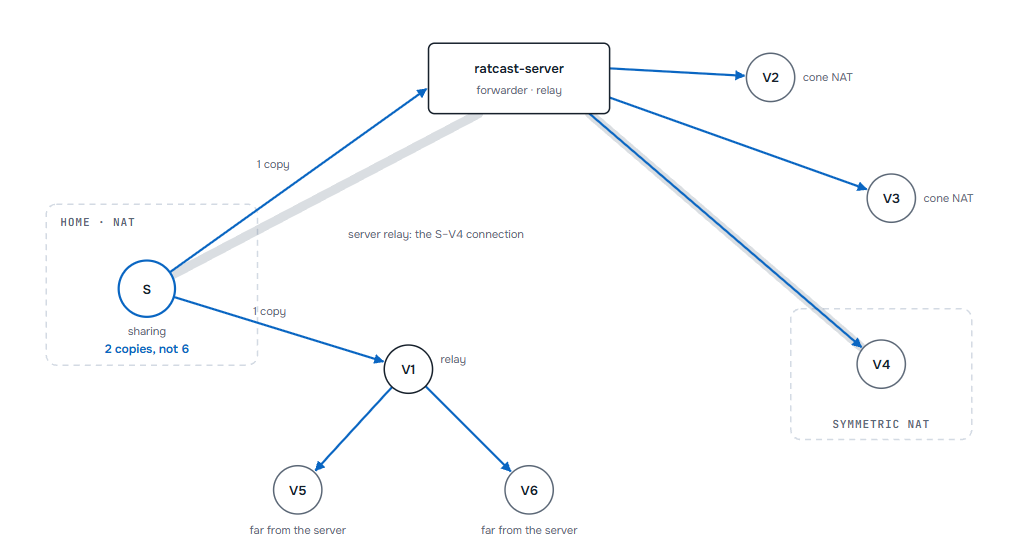
In the room in that picture the sharer uploads two copies instead of six. Voice always goes directly between people, because it is small and every millisecond of delay is noticeable in a conversation.
Servers are not required for any of this. They just make big rooms and difficult networks easier, and anyone can run one on a cheap VPS with a single command.
Picture and sound that are pleasant to live with
Watching a movie through a video call usually looks like watching it through a dirty window. I wanted ratcast to be good enough that you forget about it.
Modern video codecs. ratcast prefers AV1, the newest widely available video codec, which gives noticeably better picture at the same bitrate than the H.264 most calling apps still default to. It falls back to HEVC and H.264 when someone’s hardware cannot handle AV1, and always picks the best format everyone in the room understands. Shares go out at the screen’s own resolution, 4K included.
Your graphics card does the work. On NVIDIA, AMD and Intel GPUs ratcast uses the built-in hardware encoders (NVENC, AMF, Quick Sync), and VideoToolbox on a Mac. On Windows, macOS and Android the picture goes from the screen to the encoder without ever leaving the GPU, so sharing a game does not eat the CPU the game needs.
Low latency on real networks. On a single machine a picture takes about 18 milliseconds from capture to screen, roughly one frame at 60 fps. Over the internet you add the network’s own delay and very little else. The trick that matters most is simple: every frame has a deadline. If a frame arrives too late to be useful, it is dropped instead of making everything after it wait. Lost packets are repaired with forward error correction (a bit of extra data that lets the receiver rebuild missing pieces) and quick resends, as long as there is still time. That is the difference between live video and a buffering progress bar.
The sound you actually want. When you share a window or a screen, viewers hear what your applications play, but not the call itself, so nobody hears their own voice echoing back through your movie. Voice gets echo cancellation, noise suppression and automatic gain from WebRTC’s audio processing, the same code that runs in Chrome’s video calls. You can set the volume of each person and of the share separately, mute, deafen, and see who is speaking.
There is also a camera if you want to show your face next to the share, a text chat beside the call, and a stats panel (Ctrl+I) for the curious, showing bitrate, latency and losses live.
Private by construction
Every connection in ratcast is encrypted with the Noise protocol, the same framework WireGuard and WhatsApp are built on. On top of that, every audio and video frame is sealed a second time with SFrame (RFC 9605), a standard designed exactly for the case where media passes through servers that should not be able to look inside. A relay or a forwarding server only ever handles sealed frames, and the keys are exchanged directly between the people in the call.
There is no account database to leak, and no company that could be asked to hand over your calls, because there is no company in the path at all.
Rooms, groups and friends
Different evenings need different shapes, so ratcast has three ways to meet:
- A room is a one-off meeting, like a Zoom link: make it, send it, done.
- A group is a room that lasts, closer to a Discord server for a small circle. You send its link once, and from then on you can see who is in it right now and who is sharing. The group is kept by its members’ devices, not by a server. If its link ever leaks, you reset it: the old link stops working and members get the new one automatically.
- Friends can call each other directly. You see who is online or in a room, and when you call someone, every device of theirs rings.
Trying it
Grab the latest build from the releases page or from ratcast.app:
- Windows 10/11: a zip, unpack and run
ratcast.exe. - Linux: an AppImage, for Ubuntu 24.04, Debian 13, Fedora 40 or anything newer with PipeWire.
- macOS 14+ on Apple Silicon (preview): a DMG. It is not notarized yet, so open it the first time with right-click → Open.
- Android 10+ (preview): an APK, which can watch, talk, show the camera and share the phone’s screen with its sound.
The desktop app updates itself from GitHub, checking each download’s checksum, and never in the middle of a call. Then: make a room, send the link, share. If something misbehaves, the log is one click away under Open log folder, and issues on GitHub are very welcome.
For developers: libratcast
Under the app sits libratcast, the media transport, as a separate library. It moves encoded video and audio frames between peers, with deadline-based delivery, error correction, rate control and per-frame encryption, and it knows nothing about codecs or screens. That makes it usable on its own, in the same niche as SRT, RIST or the media half of WebRTC, but with peer discovery and NAT traversal included. It has a plain C API, it can carry an MPEG-TS feed in and out with the ratcast-send and ratcast-recv tools, and a GStreamer plugin in the spirit of the existing SRT and RIST elements is on the list, so other video software can plug into it. (If GStreamer is new to you, I wrote about capturing H.264 with it a while ago.)
The networking underneath is librats. If you are curious how a node finds peers and punches through routers, start with the librats introduction, and for the numbers, the comparison with libp2p.
Where it is going
ratcast is young. The first commit is from October, and it has been my daily driver for movie nights almost since then. macOS and Android are still marked preview, there is no iOS or browser version yet, and the text chat is deliberately simple. What already works is the thing I built it for: a few friends, one shared screen, good picture, clear voices, and nothing in the middle that can be switched off.
If that sounds like your Friday evenings too, download it, send a room link to someone, and tell me how it went. And if you like the idea of software that does not need a data centre to connect two people, a star on GitHub helps more people find it.