GStreamer H264/MP4 decoding in C/C++: basics and buffer manipulation
GStreamer from C/C++: building H264/MP4 decode pipelines, gst-launch-1.0 basics, appsink/appsrc buffer manipulation and camera capture.
Exploring GStreamer and pipelines
Before we get to the code, let’s look at what we can do without it. GStreamer ships with a few useful utilities, in particular:
gst-inspect-1.0lists the available codecs and modules, so you can see straight away what you have to work with and pick a set of filters and codecs.gst-launch-1.0lets you run any pipeline.
GStreamer uses a scheme in which a stream passes through a series of components, from the source to the sink. Anything can be the source: a file or a device. The output (sink) can likewise be a file, the screen, or a network output over some protocol (RTP, for instance).
A simple example of using gst-launch-1.0 to connect elements and play audio:
gst-launch-1.0 filesrc location=/path/to/file.ogg ! decodebin ! alsasink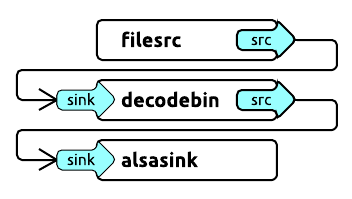
filesrc opens the file, decodebin decodes it, and alsasink plays the audio.
Another more complex example of playing an mp4 file:
gst-launch-1.0 filesrc location=file.mp4 ! qtdemux ! h264parse ! avdec_h264 ! videoconvert ! autovideosinkThe input takes an mp4 file, which goes through the mp4 demuxer — qtdemux — then through the h264 parser, the decoder, the converter and finally to the output.
You can replace autovideosink with filesink plus a location parameter and write the decoded stream straight to a file.
Programming with the GStreamer C/C++ API: let’s try to decode
Now that we know how to use gst-launch-1.0, let’s do the same thing inside our own application. The principle stays the same — we build a decoding pipeline — but now we use the GStreamer library and glib events.
We will walk through a live example of H264 decoding.
A GStreamer application is initialized once, with:
gst_init (NULL, NULL);If you want to see what’s happening in detail, set the logging level before initialization:
gst_debug_set_active(TRUE);
gst_debug_set_default_threshold(GST_LEVEL_LOG);
Note: no matter how many pipelines your application has, calling gst_init once is enough.
Let’s create the event loop in which events will be processed:
GMainLoop *loop;
loop = g_main_loop_new (NULL, FALSE);
Now we can start building our pipeline. Let’s declare the elements we need, including the pipeline itself, all of type GstElement:
GstElement *pipeline, *source, *demuxer, *parser, *decoder, *conv, *sink;

pipeline = gst_pipeline_new ("video-decoder");
source   = gst_element_factory_make ("filesrc",       "file-source");
demuxer  = gst_element_factory_make ("qtdemux",      "h264-demuxer");
parser   = gst_element_factory_make ("h264parse",      "h264-parser");
decoder  = gst_element_factory_make ("avdec_h264",     "h264-decoder");
conv     = gst_element_factory_make ("videoconvert",  "converter");
sink     = gst_element_factory_make ("appsink", "video-output");
Each element of the pipeline is created via gst_element_factory_make, where the first parameter is the element type and the second is an arbitrary name that GStreamer will use later on (when reporting errors, for example).
It is also a good idea to check that all the components were found — gst_element_factory_make returns NULL if one was not.
if (!pipeline || !source || !demuxer || !parser || !decoder || !conv || !sink) {
    // one element is not initialized - stop
    return;
}
We set the location parameter via g_object_set:
g_object_set (G_OBJECT (source), "location", argv[1], NULL);Parameters of the other elements are set the same way.
Now we need a GStreamer message handler, so let’s attach the corresponding bus_call:
GstBus *bus;

guint bus_watch_id;
bus = gst_pipeline_get_bus (GST_PIPELINE (pipeline));
bus_watch_id = gst_bus_add_watch (bus, bus_call, loop);
gst_object_unref (bus);
gst_object_unref and similar calls are needed to release the objects we allocated.
And here is the message handler itself:
static gboolean
bus_call (GstBus     *bus,
          GstMessage *msg,
          gpointer    data)
{
  GMainLoop *loop = (GMainLoop *) data;
  switch (GST_MESSAGE_TYPE (msg)) {
    case GST_MESSAGE_EOS:
      LOGI ("End of stream\n");
      g_main_loop_quit (loop);
      break;

    case GST_MESSAGE_ERROR: {
      gchar  *debug;
      GError *error;

      gst_message_parse_error (msg, &error, &debug);
      g_free (debug);
      LOGE ("Error: %s\n", error->message);
      g_error_free (error);
      g_main_loop_quit (loop);
      break;
    }

    default:
      break;
  }
  return TRUE;
}
And now the most important part: we collect all the created elements into a single pipeline — the same one we assembled with gst-launch earlier. The order matters, of course:
gst_bin_add_many (GST_BIN (pipeline), source, demuxer, parser, decoder, conv, sink, NULL);
gst_element_link_many (source, demuxer, parser, decoder, conv, sink, NULL);
It is worth noting that this way of linking elements works perfectly for stream outputs, but playback (autovideosink) requires additional synchronization and dynamic linking of the demuxer and the parser:
gst_element_link (source, demuxer);
gst_element_link_many (parser, decoder, conv, sink, NULL);
g_signal_connect (demuxer, "pad-added", G_CALLBACK (on_pad_added), parser);

static void
on_pad_added (GstElement *element,
              GstPad     *pad,
              gpointer    data)
{
  GstPad *sinkpad;
  GstElement *decoder = (GstElement *) data;

  /* We can now link this pad with the sink pad */
  g_print ("Dynamic pad created, linking demuxer/decoder\n");

  sinkpad = gst_element_get_static_pad (decoder, "sink");
  gst_pad_link (pad, sinkpad);
  gst_object_unref (sinkpad);
}
Unlike a static link, a dynamic one makes it possible to discover the type and the number of streams, and in some cases it is the only thing that works.
And finally, let’s switch the pipeline state to playing:
gst_element_set_state (pipeline, GST_STATE_PLAYING);And run the event loop:
g_main_loop_run (loop);After that, everything has to be cleaned up:
gst_element_set_state (pipeline, GST_STATE_NULL);
gst_object_unref (GST_OBJECT (pipeline));
g_source_remove (bus_watch_id);
g_main_loop_unref (loop);
Choosing encoders and decoders, and falling back
There is one more useful thing the documentation barely mentions: how to easily set up a fallback decoder or encoder.
The gst_element_factory_find function helps here by checking whether a codec is present in the element factory:
if(gst_element_factory_find("omxh264dec"))
  decoder  = gst_element_factory_make ("omxh264dec",     "h264-decoder");
else
  decoder  = gst_element_factory_make ("avdec_h264",     "h264-decoder");
In this example we prefer the OMX hardware decoder on the RDK platform and fall back to a software implementation when it is missing.
Another extremely useful but even more rarely used trick is to check what we actually initialized in a GstElement (which of the many codecs it ended up being):
gst_plugin_feature_get_name(gst_element_get_factory(encoder));That simple call returns the name of the initialized codec.
Video color models
Since we are talking about encoding video from cameras, we can’t skip color models — and that is where YUV enters the stage (far more often than RGB).
Cameras simply love the YUYV color model, while GStreamer much prefers the usual I420. Unless you are rendering into a GL frame, you will be dealing with I420 frames as well, so be ready to set up the filters you need and to convert between formats.
Some encoders can work with other color models too, but those are usually exceptions to the rule.
It is also worth noting that GStreamer has its own module for capturing video from a camera, which you can use to build a pipeline — but that is a topic for another time.
Working with buffers: taking data on the fly
Input buffer
It’s time to deal with data flows. Until now we simply decoded whatever was in the file through filesrc and sent everything to a filesink or to the screen.
Now we will work with buffers and with the appsrc / appsink input and output elements. For some reason the official documentation hardly covers this.
So how do we push a continuous data flow into the pipelines we built — or, to be precise, feed the input buffer and get an encoded or decoded output buffer back? Let’s say we grabbed an image from the camera and we need to encode it. We have already established that we need a frame in I420 format. Suppose we have one — what’s next? How do we pass a picture through the whole pipeline?
First, let’s set up the need-data event handler, which is called whenever the pipeline needs to be fed, and start filling the input buffer:
g_signal_connect (source, "need-data", G_CALLBACK (encoder_cb_need_data), NULL);The handler itself has the following form:
encoder_cb_need_data (GstElement *appsrc,
                      guint       unused_size,
                      gpointer    user_data)
{
  GstBuffer *buffer;
  GstFlowReturn ret;
  GstMapInfo map;

  int size = 1.5 * 640 * 480; // typical I420 640x480 image for example
  uint8_t* image; // prepared I420 image data (replace with your buffer)

  // Copy image to the buffer
  buffer = gst_buffer_new_allocate (NULL, size, NULL);
  gst_buffer_map (buffer, &map, GST_MAP_WRITE);
  memcpy((guchar *)map.data, image,  gst_buffer_get_size( buffer ) );
  gst_buffer_unmap(buffer, &map);
  g_signal_emit_by_name (appsrc, "push-buffer", buffer, &ret);
  gst_buffer_unref(buffer);
}
Here image is pseudocode for our I420 image buffer.
Next we create a buffer of the required size through gst_buffer_new_allocate, matching the size of the image buffer.
With gst_buffer_map we put the buffer into write mode and use memcpy to copy our image into it.
And finally we signal to GStreamer that the buffer is ready.
Note: it is essential to call gst_buffer_unmap after writing and to release the buffer with gst_buffer_unref. Otherwise you will leak memory. The few examples available out there are not particularly concerned about memory usage, even though it matters a lot.
Now that the handler is done, one more thing is left: configuring the caps for the format we expect to receive.
This is done before installing the need-data signal handler:
g_object_set (G_OBJECT (source),
              "stream-type", 0,
              "format", GST_FORMAT_TIME, NULL);

g_object_set (G_OBJECT (source), "caps",
              gst_caps_new_simple ("video/x-raw",
                                   "format", G_TYPE_STRING, "I420",
                                   "width", G_TYPE_INT, 640,
                                   "height", G_TYPE_INT, 480,
                                   "framerate", GST_TYPE_FRACTION, 30, 1,
                                   NULL),
              NULL);
Like all GstElement parameters, these are set via g_object_set.
Here we define the stream type and its caps — the data format. We specify that appsrc will be fed I420 data at 640×480 resolution and 30 frames per second.
The frame rate plays no real role here, or in general: while working on this we never noticed GStreamer limiting need-data calls by frequency.
That’s it — our frames are now fed into the encoder.
Output buffer
Now let’s see how to get the encoded output stream.
We attach the handler to the sink pad:
GstPad *pad = gst_element_get_static_pad (sink, "sink");
gst_pad_add_probe  (pad, GST_PAD_PROBE_TYPE_BUFFER, encoder_cb_have_data, NULL, NULL);
gst_object_unref (pad);
This subscribes us to another sink pad event, GST_PAD_PROBE_TYPE_BUFFER, which is triggered as a data buffer enters the sink pad.
static GstPadProbeReturn
encoder_cb_have_data (GstPad * pad,
                      GstPadProbeInfo * info,
                      gpointer user_data) {
  GstBuffer *buf = gst_pad_probe_info_get_buffer (info);
  GstMemory *bufMem = gst_buffer_get_memory(buf, 0);
  GstMapInfo bufInfo;

  gst_memory_map(bufMem, &bufInfo, GST_MAP_READ);

  // bufInfo.data, bufInfo.size will contain encoded image data as output of out pipeline
  gst_memory_unmap(bufMem, &bufInfo);
  return GST_PAD_PROBE_OK;
}
The callback has a similar structure. This time we need to reach the buffer memory: first we get the GstBuffer, then a pointer to its memory with gst_buffer_get_memory at index 0 (as a rule it is the only one involved). Finally, gst_memory_map gives us the data address bufInfo.data and its size bufInfo.size.
Using the same technique you can push and receive encoded or decoded data through a pipeline of any complexity, with decoding elements, encoding elements or even filters. My recommendation is to prepare and test your pipeline with the gst-launch-1.0 console utility first, and only then build the same pipeline in native code.